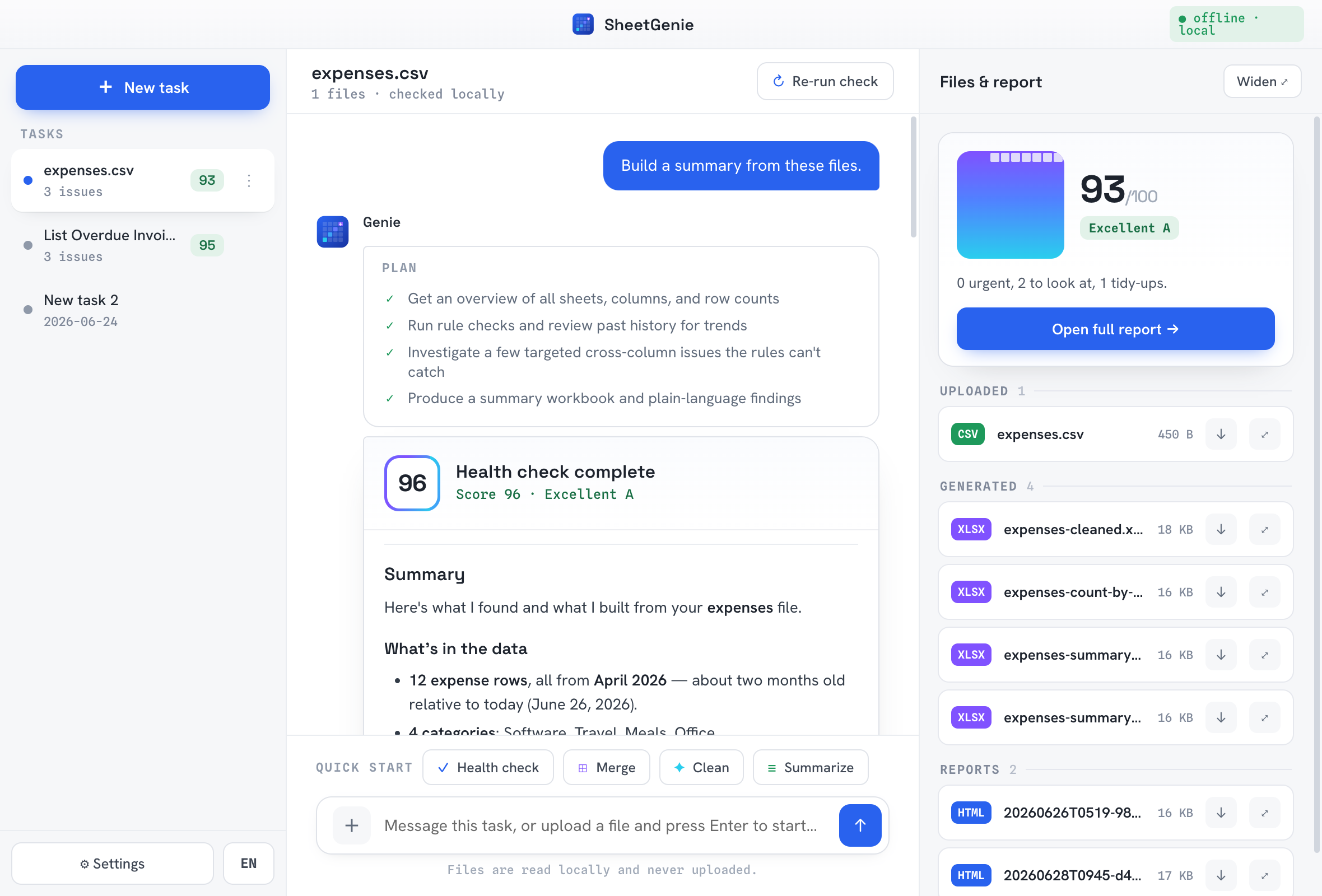
Drop a file. Say what you need. The AI does the rest.
SheetGenie's AI agent plans the steps, does the work, and double-checks its own results — and shows you every step while it runs, like a careful assistant.
Drop in your spreadsheet
Sales exports, expense sheets, inventory lists — Excel or CSV, messy is fine. SheetGenie reads it on your machine and instantly suggests what it can help with.
Ask the AI in plain English
No formulas, no pivot tables. "Combine these three months into one summary" — the AI turns what you say into a plan and delivers ready-to-open results.
Review and keep the results
You get new spreadsheets and summaries — your originals are never touched. Every suggested fix waits for your confirmation.
An AI data assistant, not just a checker.
Data health report
A plain-language report of what's wrong in your data: duplicates, missing fields, odd amounts, inconsistent names — each finding pointing to the exact row.
Plain-English requests
Clean up a customer list, combine three monthly exports, build a category summary for the boss — say it like you would to a colleague and get back a ready-to-open spreadsheet.
Watch the AI work
A live feed shows the agent's plan and every action as it happens — reading sheets, running checks, writing files. No black box.
Never silently changes data
Iron rule: originals are read-only. Fixes are proposed as before → after and only written — to a new file — after you confirm.
Bring your own AI
Works with DeepSeek, OpenAI, or Anthropic using your own API key, stored encrypted in your OS keychain. You control the cost and the provider.
English & 中文
Interface and reports in your language — switch anytime.
Local-first, by design — not by promise.
Most data tools ask you to upload your business. SheetGenie is a desktop app: the spreadsheet stays on your disk, and the safeguards are enforced in code.
Get SheetGenie Free during beta
Everything is free while SheetGenie is in beta. Run the built-in checks fully offline, or bring your own AI key for the full agent — a zero-setup Pro plan with built-in AI is coming later.
macOS
Download for MacWindows
Coming soonsheetgenie.app on your Mac — or email yourself the link.
Questions, answered plainly.
What is SheetGenie?
SheetGenie is a desktop AI assistant for your everyday business spreadsheets — sales reports, expense sheets, inventory lists, customer data. It works with Excel and CSV, reads everything locally on your computer, flags problems like duplicates and missing fields (each pointing to the exact row), and turns messy sheets into clean reports from requests you type in plain English.
Is my spreadsheet data uploaded anywhere?
No. Files are read, checked, and written entirely on your computer. When AI is used, a code-enforced redaction gate sends only de-identified table structure — column names, types, patterns — never your raw cell values, names, emails, or amounts.
Will SheetGenie change my original files?
Never. Originals are read-only. Results are always written to new files, and every suggested fix is shown as before → after and only applied after you confirm it.
Do I need to know Excel formulas?
No. You describe what you need in plain English (or Chinese) — for example, "find the out-of-stock items and build a summary by category" — and SheetGenie plans the steps, does the work, verifies its own results, and hands you the files.
How is SheetGenie different from ChatGPT or Copilot?
General AI chatbots need you to upload your spreadsheet to the cloud and write good prompts. SheetGenie is a local AI agent purpose-built for spreadsheets: your files never leave your computer, every finding cites the real rows it inspected, the built-in checks run offline and deterministically (no made-up results), and every change waits for your confirmation as a before → after diff. The AI plans the work; verified on-machine operations execute it — the model never types a single cell value.
Which AI models does SheetGenie work with?
You bring your own API key for DeepSeek, OpenAI, or Anthropic. The key is stored encrypted in your OS keychain. Built-in rule checks also run fully offline without any AI key.
Is SheetGenie free? What platforms does it support?
Everything is free during the beta. The built-in checks run offline at no cost, and AI features use your own provider key (billed by your provider). Later, a paid Pro plan will add built-in AI with zero setup — the local core stays free. Currently macOS (Apple Silicon); Windows is coming soon.